

Technical production · UK & Saudi Arabia
Adaptation with intent
We make live events, LED systems and virtual production work.
Morph is a technical production and interactive media company, providing operators and software services. We solve technical problems in creative ways and build 3D environments, games and the software that controls the show.

Credits from Joe’s career include Warner Bros. · ITV · Gucci · Coldplay · The Chemical Brothers · Riyadh Air · Sky · World Athletics
Morph / On the day
Technical competency. Clean execution.
Select any part of a typical LED volume to see what Morph looks after, and where Joe has done it before.
Diagram of a typical LED volume. Camera tracking feeds the render cluster. The render cluster and the media server feed signal routing, which feeds LED processing, which drives the LED volume. Sync and timing lock the camera tracking, the render cluster and the LED processors together. The media server also drives the lighting. Monitoring and control watches the render cluster and the media server.
- Sync Sync and timing
- What we look after House sync, genlock and framelock across cameras, render nodes and processors: the difference between a clean frame and a tear.
- From Joe’s credits Six-node cluster sync for the Volvo AR safety demo, and multi-node nDisplay clusters on the ARRI x CT stage.
- Morph tool Morph Machines (sync and framelock alerts)
- Data Camera and tracking
- What we look after Tracking systems set up, calibrated and checked against the lens, so the wall’s perspective follows the real camera.
- From Joe’s credits Real-time Vicon tracking on the Gucci and Reef adverts at Alhisn BigTime Studios, Riyadh.
- Video Render cluster
- What we look after nDisplay clusters specified, built and tuned for a steady frame rate on every output.
- From Joe’s credits Ten render servers built and prepared for Alhisn BigTime Studios, Riyadh.
- Morph tool Morph Machines
- Video Media server and playback
- What we look after 2D and 2.5D plate playback, Pixera programming and timeline control, for when real-time isn’t the right answer.
- From Joe’s credits Burning-forest plates rendered in Unreal and nDisplay for Rapture; Unreal and Pixera playback for the Riyadh Air inflight safety video.
- Morph tool Morph Magic
- Video Signal routing
- What we look after Video matrix, SDI and network routing designed and documented before the kit arrives.
- From Joe’s credits The render-to-wall signal path for the ten-server curved volume at Alhisn BigTime Studios.
- Morph tool Morph Diagrams
- Video LED processing
- What we look after Processor configuration, canvas mapping and a colour workflow set up for camera.
- From Joe’s credits LED colour workflows developed on the ARRI x CT virtual production stage.
- Morph tool LED Configurator
- Video LED volume
- What we look after Walls, curves and ceilings built, commissioned and calibrated, then handed over in a state the next crew can read.
- From Joe’s credits The curved Ruby 2.3c volume in Riyadh and the LED volume for Rapture.
- Morph tool Morph Diagrams
- DMX Lighting
- What we look after DMX and pixel-mapped fixtures driven by the same content as the wall, so the light on faces matches the world behind them.
- From Joe’s credits Pixel-mapped the MBS Pixel Brute from the playback on Rapture; DMX-integrated playback on ITV’s Believe Me.
- Morph tool Morph Shaders
- Data Monitoring and control
- What we look after Fleet health, alerts and remote operation, so problems surface before they reach the lens.
- From Joe’s credits Remote operation and control R&D on the ARRI x CT stage; camera frustums watched on the stage multiviewer during Spies in Disguise.
- Morph tool Morph Machines
Precision. Control. Confidence. Reliability. The system feels engineered before a single word is spoken.
Morph / Disciplines
Six disciplines. One accountable lead.
From a single playback operator to a full volume build, Morph scales to the job, with the same standard at every size.

-
LED systems
Installation and operation with clean signal flow.
Volume and stage builds, commissioning, render clusters, processor set-up, colour workflows, genlock and framelock, handed over documented, tested and ready for camera.
From Joe’s career Joe commissioned the curved Ruby 2.3c volume at Alhisn BigTime Studios, Riyadh, and built the LED volume for Rapture.
Brief us on this for LED systems -
Live events
Technical direction for experiences that must work now.
Playback and show operation, Pixera media-server programming, live graphics and data-driven scoreboards, keynote and conference systems, with rehearsed fallbacks for the moment something doesn’t work.
From Joe’s career Joe’s credits include the Joy Awards in Riyadh, Brockwell Live, COP27 and live-graphics software used at more than ten World Athletics championships.
Brief us on this for live events -
Software engineering
Bespoke tools for stages, shows and studios.
Control systems, monitoring dashboards, playback utilities, web apps and pipeline automation, written by the person who’ll be standing next to them on the day.
From Joe’s career Joe’s credits include the World Athletics live-graphics control system, Ryder Cup and ATP scoreboards, digital signage for the G7 Summit and Cisco Live, and Morph’s own Machines, Magic and Diagrams.
Brief us on this for software engineering -
AI consultancy
Practical AI for production teams.
Agentic and LLM workflows, generative previs and concept pipelines, and automation that gives crew hours back, introduced with a human in the loop and your data kept where it belongs.
From Joe’s practice Joe uses agentic and generative tools in his own work, from development to previs and concept art, and built the Skybox Gallery of AI-generated 360° skyboxes.
Brief us on this for AI consultancy -
Interactive media
Responsive content that changes with people and place.
Real-time content in Unreal, AR and VR experiences, exhibits and installations, and synchronised shows across screens, phones and devices.
From Joe’s career Joe’s credits include 20 synchronised devices for Google Home at MWC, the Volvo AR safety demo and the Doha 2019 stadium VR previs.
Brief us on this for interactive media -
Virtual production
Supervision where physical and digital systems meet.
In-camera VFX on LED volumes: Unreal Engine and nDisplay operation, camera tracking with Vicon, 2D and 2.5D plate playback, DMX and pixel-mapped lighting, motion-control integration, techvis and previs.
From Joe’s career Joe’s credits include 7Dogs, Rapture, Believe Me, Gucci and The Chemical Brothers’ ‘Live Again’.
Brief us on this for virtual production
Not sure which you need? Describe the day and we’ll tell you what it takes.
Build a briefMorph / In-house software
We build the tools we run the stage with.
When the right tool doesn’t exist, Joe writes it. Morph’s in-house software covers the unglamorous parts of a show (LED layouts, sync, playback, signal flow, looks and boards) so problems surface in prep, not on the day. Want one of these on your job, or something bespoke? Ask.
Live demo
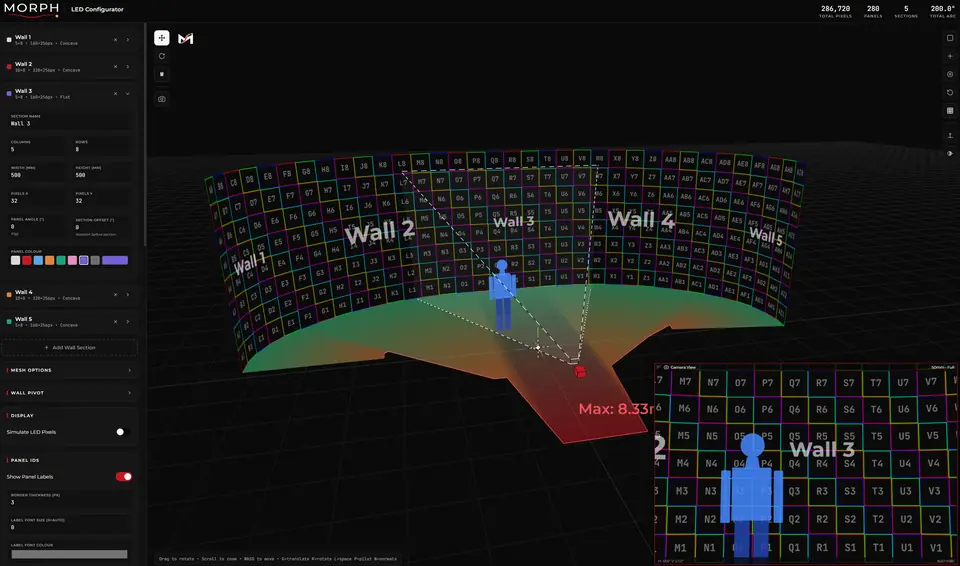
LED Configurator
LED volumes and video walls, planned in 3D.
Design a stage from wall sections, each with its own panel size and pixel count, curved or angled for corners. Every panel gets an ID the build crew can follow, and a real camera, with ARRI, RED and Sony filmbacks and 8 to 800 mm lenses, shows what the frame covers from where it stands.
Open the live demo of the LED Configurator(opens in a new tab)
- Sections, each with its own panel size, pixels, curve and angle.
- Running totals: pixels, panels, sections and the volume’s arc.
- The camera’s view through a 50 mm lens, with a figure for scale.
- Curved, flat and angled sections, panel by panel
- Camera filmbacks, lenses and safe distances
- Panel IDs, and OBJ, glTF and JSON export
Hub v1.0
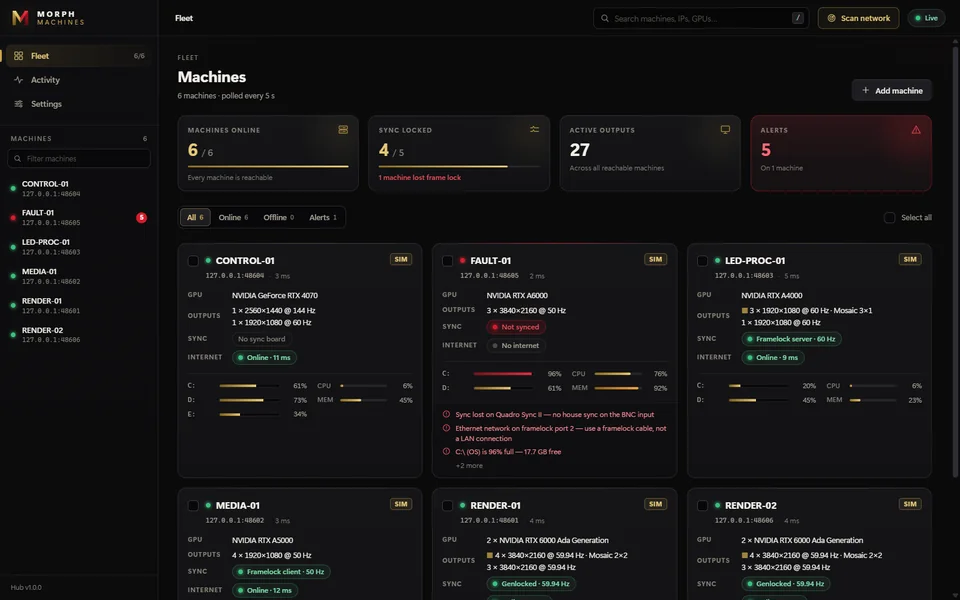
Morph Machines
Fleet monitoring for render and playback nodes.
See every machine on the network at a glance: sync and framelock state, active outputs, GPUs, disks and memory. When something drifts, it tells you in plain English, down to ‘no house sync on the BNC input’.
- Fleet summary: machines online, sync locked, active outputs and alerts.
- Alerts that tell the crew exactly what to fix.
- Every output, resolution and refresh rate, per machine.
- Genlock and framelock state per node
- Outputs, GPUs, disks and memory in one view
- Plain-English alerts, polled every five seconds
In-house
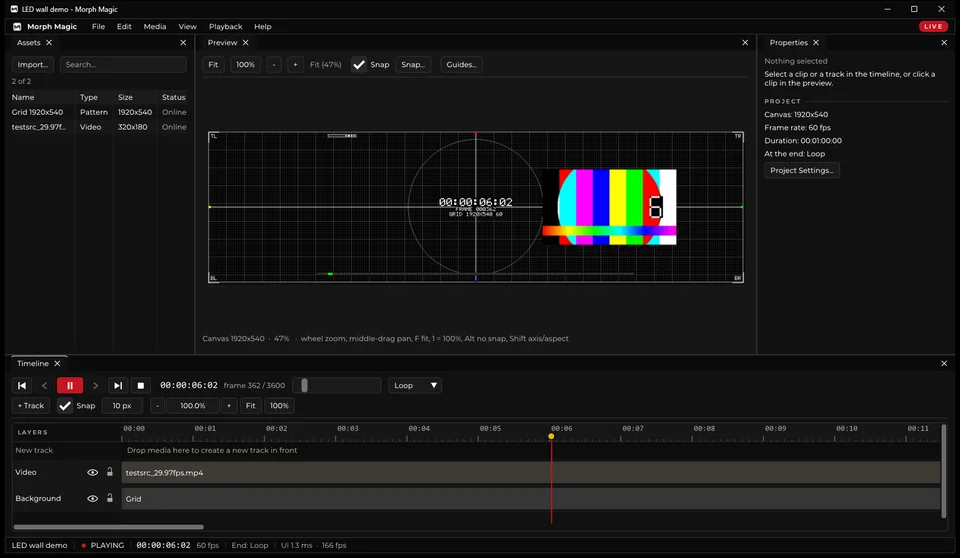
Morph Magic
Lightweight playback for LED walls.
A timeline player built for LED canvases, with a pixel-accurate preview, test grids, tracks and loop modes, snapping and guides, and a LIVE mode that stays out of the operator’s way. The interface draws in 1.3 milliseconds.
- Pixel-accurate canvas preview with a built-in test grid.
- Frame-accurate transport and timecode.
- Its own performance, measured live.
- Pixel-accurate canvas preview
- Tracks, loops, snapping, guides and test grids
- A LIVE mode built for show conditions
Live demo
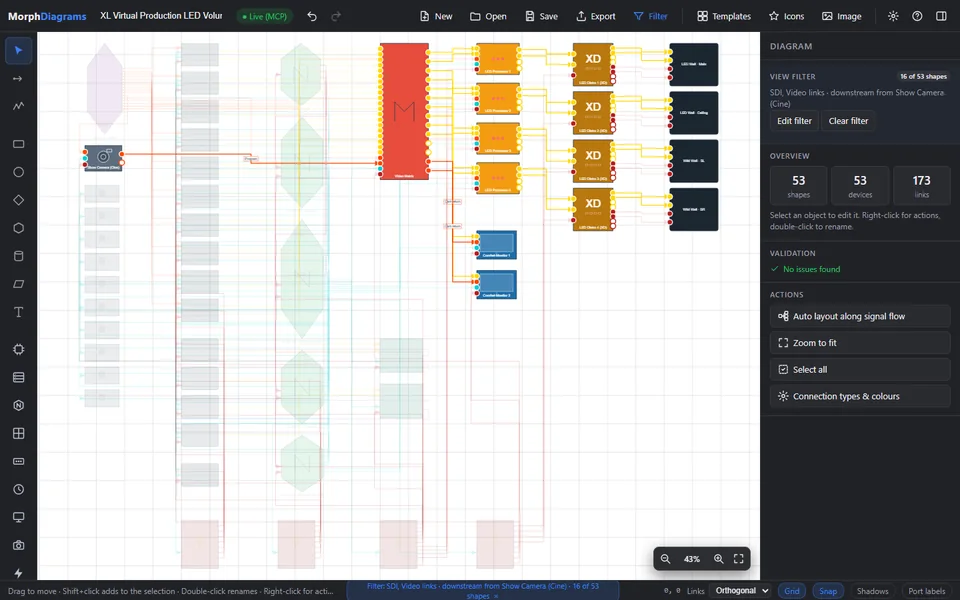
Morph Diagrams
Signal-flow diagrams that check themselves.
Browser-based system diagrams for stages and studios. Map camera to matrix to processors to walls, filter by link type, validate the whole system and auto-lay it out along the signal flow. No dependencies.
- Start at the show camera…
- …and follow every link through the matrix and processors to the walls.
- Validation catches bad patches before the crew does.
- Signal flow from camera to wall
- Filter by link type and validate
- Auto-layout along the signal path
49 effects
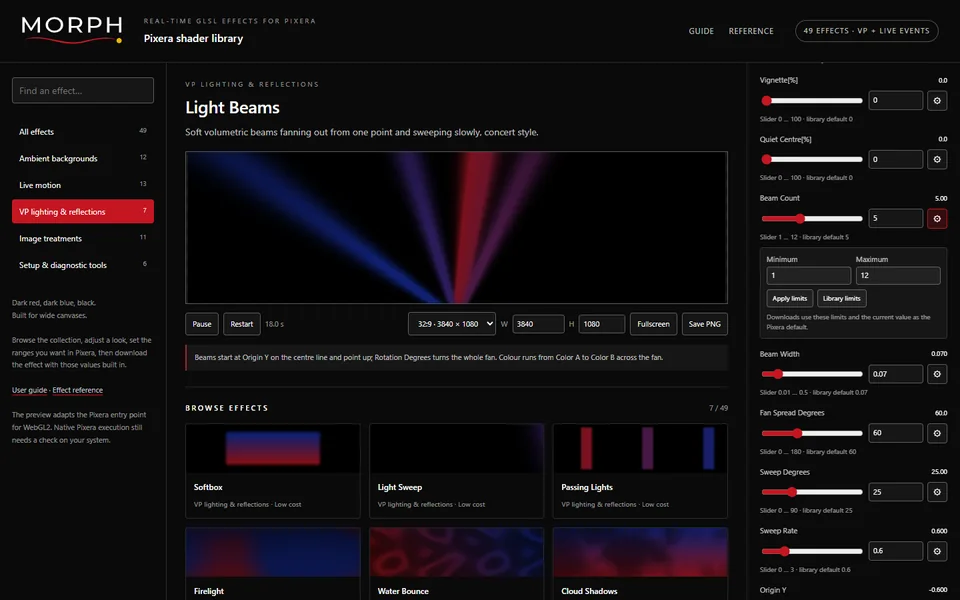
Morph Shaders
Real-time GLSL effects for Pixera.
Forty-nine effects for virtual production and live events, covering ambient backgrounds, live motion, VP lighting and reflections, image treatments and set-up tools. Preview them live, tune the ranges and export with your values baked in.
- 49 effects across five categories
- Live WebGL2 preview with adjustable ranges
- Export with your values baked in
In-house
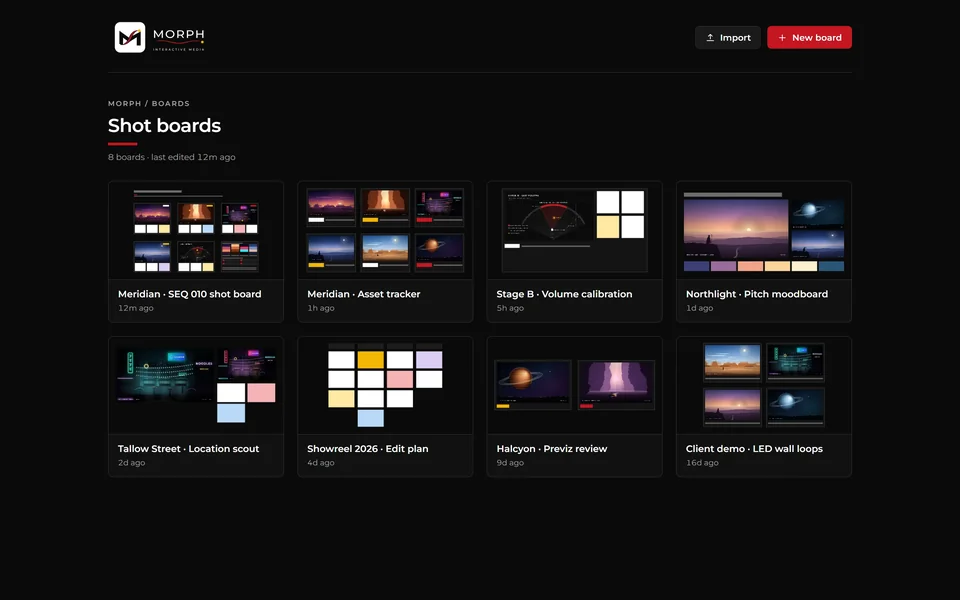
Morph Boards
Shot boards, moodboards and asset trackers.
One place for sequences, previs reviews, volume calibration notes and LED wall loops, so the art department, VP team and camera are looking at the same picture.
- Shot boards and moodboards
- Previs reviews and calibration notes
- LED wall loop libraries
Prototype 0.1
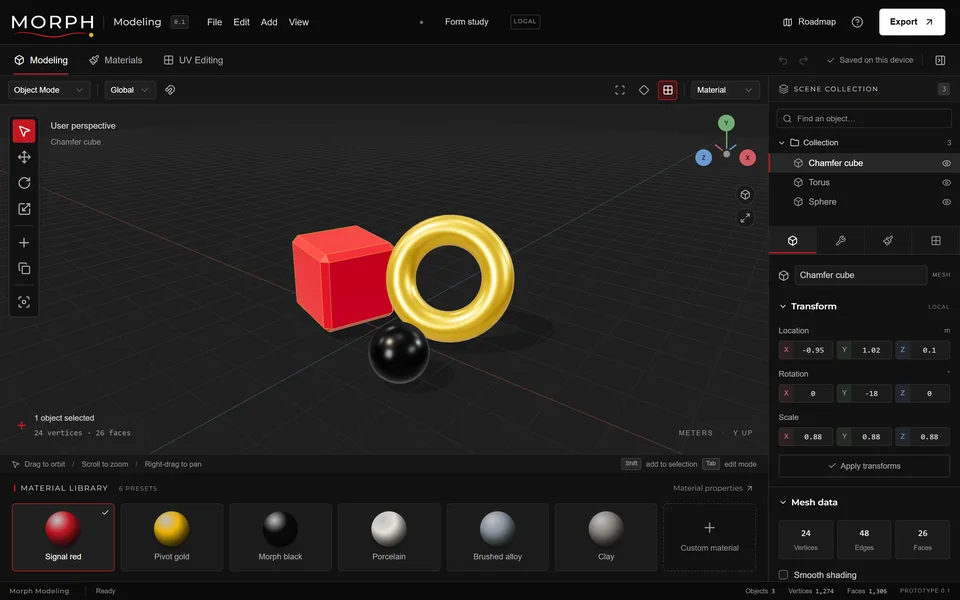
Morph Modeling
3D modelling in the browser.
Modelling, materials and UV editing in a browser tab, with a material library that speaks the brand. An early prototype, and a glimpse of where Morph’s tooling is heading.
- Modelling, materials and UV editing
- Runs in the browser, saves on your device
- A brand material library
Open tools from Joe’s GitHub
-
Morph Mapping
A projection warp and blend study.
Open Morph Mapping(opens in a new tab) -
Test-Pattern Generator
Loopable projection test patterns, rendered to video.
View on GitHub: Test-Pattern Generator(opens in a new tab) -
Skybox Gallery
A gallery of AI-generated 360° skyboxes.
Open Skybox Gallery(opens in a new tab)
LED canvas calculator
It’s the first question on every LED job, so we built the answer into the site.
- Wall size
- Canvas
- Aspect ratio
- Pixels
- Versus UHD
- Panels
A 24 × 8 wall of 500 × 500 mm panels at 2.6 mm gives a 4,608 × 1,536 pixel canvas, 12.00 × 4.00 m.
A planning estimate for generic panels. Real canvases depend on the exact panel model, processor mapping and receiving cards, which is exactly what Morph checks before anything is built. For full layouts, try Joe’s LED Configurator(opens in a new tab).
Morph / How we work
Responsive by nature. Flexibility, up to a point.
A practical rhythm for live events, LED systems, virtual production and interactive media, and the way every Morph job runs.
-
01 Adapt
Read the environment
Flex with the signal.
Recce, specs and constraints come first. Stage, content, camera, lighting and schedule are mapped into one signal-flow diagram before anything is hired or rendered.
You get
- Tech recce
- System diagram
- Kit and crew plan
-
02 Direct
Shape the response
Hold the direction.
Techvis, content preparation and a build plan that keeps its shape when the day changes: sync tested, colour calibrated, patching documented, fallbacks rehearsed.
You get
- Build and commissioning
- Previs and techvis
- Test day
-
03 Impact
Commit the result
Make the moment count.
On the day, Joe runs the system from the floor (tracking, playback, lighting and render) so the director gets the shot, then hands over clean files and notes the next crew can read.
You get
- On-set supervision
- Operation
- Handover pack
Three ways in
-
Supervision and operation
A named supervisor or operator for your shoot, show or test day.
-
Project delivery
From recce to wrap: build, commissioning, content pipeline and on-set supervision, with specialist crew scaled to the job.
-
Software and consultancy
Scoped builds for tools, control systems and AI workflows, delivered in stages you can review.
Adapt to the conditions. Hold the standard. Make the point count.
Start a briefMorph / Enquiries
Tell us what has to work on the day.
A live event, an LED build, a VP shoot, or a tool that doesn’t exist yet. Build a short brief and Joe will reply personally.
Founder-led, partner-enabled. Working across the United Kingdom and Saudi Arabia.
- Brighton, UK
- Riyadh, KSA
Local time now
Email Joe directly
joeloe@morph-media.comHandy to include:
- What you’re making, where and when
- What you need from Morph
- Where you are with budget and schedule